Currently Working On
Your single in-progress task. The whole point: only one thing at a time. Flip any task to In Progress and it lands here automatically.
FlowGrid is a Notion task system built for ADHD adults. Instead of forcing tasks onto a calendar that never matches your real day, you check your energy honestly, click the matching tab, and pick one task. That is the whole system.

They assume you wake up with consistent energy, can grind through whatever the calendar puts in front of you, and only need better time blocks. ADHD brains do not work that way. Our energy moves. Our focus is binary. Our willpower runs out before lunch on the days when it shows up at all.
FlowGrid is built around one principle: match the task to your current energy, not the other way around. Working at the wrong energy level is how you burn out. Matching the task to where your brain is right now is how you build momentum.
Every section is a filtered view of the same database. Add a task anywhere, it appears in all the relevant places automatically. No manual linking, no setup, no formula tweaks.
Your single in-progress task. The whole point: only one thing at a time. Flip any task to In Progress and it lands here automatically.
A red interrupt panel that breaks autopilot mode every time you finish a task. Decision tree built in: stuck, can't focus, overwhelmed, or ready for the next one.
The signature feature. Three tabs, High, Medium, Low, each showing only the To Do tasks for that energy level. Honest self-check, one click, one task.
Auto-populated proof of progress for the days when your brain insists you did nothing. The data does not lie, even when the feeling does.
Past their date but not done. Pick one. Update its date. Move on. Overdue is not shame, it is information.
Capture the thought now, fill in the fields later. Once Status, Date, and Energy are set, the task auto-routes to the matching energy tab.
Friday reflection : tasks added, tasks completed, tasks overdue. Updates automatically. No tracking effort required.
Same view, broader window. For the wider zoom-out when you need to see whether you are actually moving or just feeling busy.
An in-page reset section with a 4-4-4 breathing guide and calming sounds. For the moments when overwhelm needs interruption before the next task is even possible.
Energy moves through your day. What was high-energy at 9am might be impossible at 3pm. The system only works if you tell yourself the truth about where you actually are.
Clear mind, well-rested, ready to think deeply.
Steady focus, moderate alertness, routine capacity.
Tired but functional. You need easy wins.
FlowGrid is built so the planning overhead never exceeds the doing. Five minutes in the morning, two minutes at the end, five minutes on Friday. Everything in between is just working.
Open Quick Capture. Add new tasks. Fill in Status, Date, Energy, Priority. Check your energy. Click the matching tab. Pick ONE task. Set Status to In Progress.
Check Currently Working On to refocus. Finish the task. Mark it Done. Read What's Next. Pick the next task based on your now-current energy. Repeat.
Open Today's Wins. Acknowledge each completion, even tiny ones. Capture tomorrow's tasks (just the names). Add details tomorrow morning, not now.
Open Last Week's Review. See your wins and patterns. Notice what energy levels worked. Feel good about progress. No new planning required.
The signature 3-tab energy picker, Currently Working On strip, sample tasks with priority color codes, and the side panels for Today's Wins and Calm Zone, all in one master database.
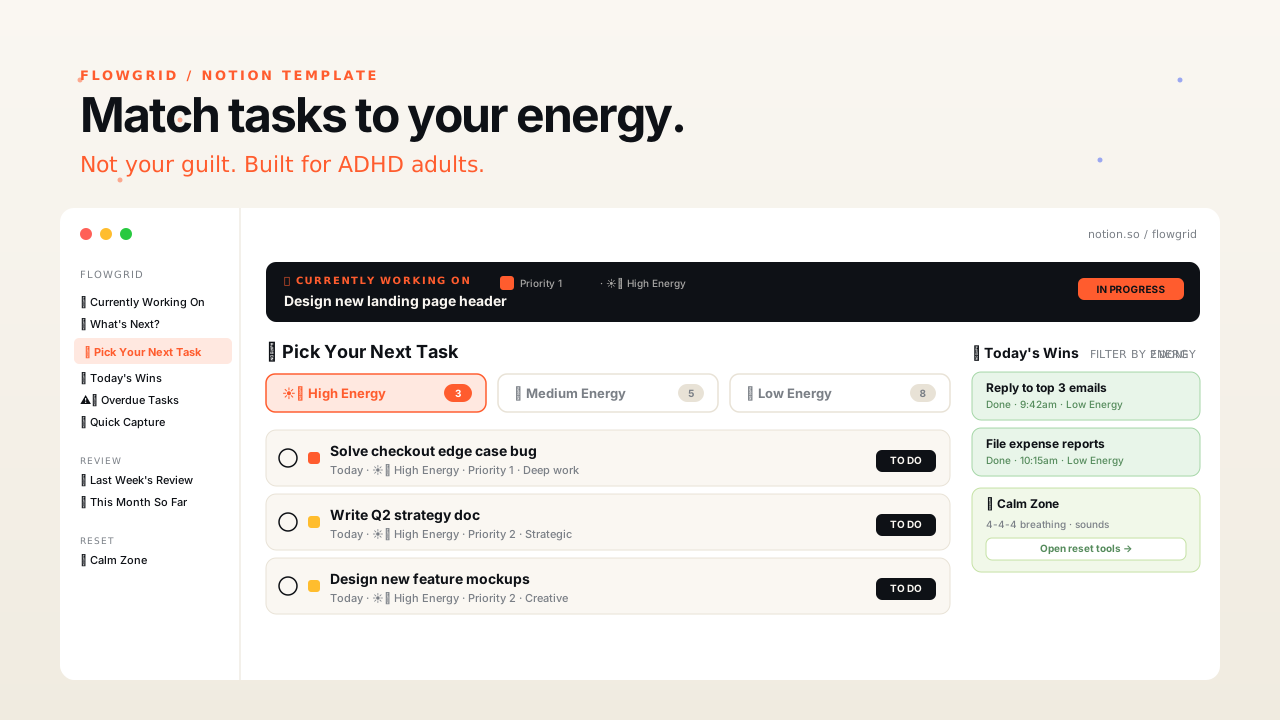
FlowGrid is a Notion task management template designed for adults with ADHD. Instead of forcing tasks into rigid time blocks, FlowGrid sorts work by the energy level required to do it. You check your energy honestly, click the matching tab, pick one task, and work on it until done. Built around the way ADHD brains actually work.
Most productivity templates assume your brain has consistent energy throughout the day and just needs better scheduling. ADHD brains do not work that way. FlowGrid is built around the principle that matching the task to your current energy beats matching it to a calendar slot. The signature feature is the 3-tab energy picker that shows you only the tasks suited to where your brain currently is.
FlowGrid includes 9 connected sections: Currently Working On, What's Next, Pick Your Next Task (the 3-tab energy picker), Today's Wins, Overdue Tasks, Quick Capture (auto-routes once required fields are filled), Last Week's Review, This Month So Far, and a Calm Zone with breathing tools and calming sounds. Everything connects to one master database, so updating a task once updates it everywhere.
No. FlowGrid runs on the free tier of Notion. You will need a Notion account, which is free, but no paid plan is required.
About 30 seconds. After purchase you receive a Notion template link from Gumroad. Click it, choose your workspace, and the template duplicates into your Notion. There is no manual database setup, no linking, no formula tweaking. Open it and start capturing tasks.
No, but it is built around problems ADHD adults experience most acutely: mismatched task-to-energy fit, task-jumping, forgotten wins, and overwhelm spirals. Anyone whose energy varies through the day will find it useful.
The Calm Zone is an in-page reset section with calming sounds and a 4-4-4 breathing guide. It is meant for the moments when you are overwhelmed, stuck, or stressed and need to interrupt the spiral before picking your next task. Taking breaks is treated as strategic, not as failing.
Yes. Gumroad offers a refund within their standard policy. If FlowGrid does not work for your brain, email hello@innermap.tools and we will help you sort it out.
One Notion template. Nine connected sections. The signature energy picker. Thirty-second setup. Twelve minutes a day to run.